Wednesday, January 13, 2010

Asynchronous and Synchornous Transfer Mode(ATM and ASM)

Asynchronous Transfer Mode
Asynchronous Transfer Mode (ATM) is a standardized digital data transmission technology. ATM is implemented as a network protocol and was first developed in the mid 1980s.The goal was to design a single networking strategy that could transport real-time video conference and audio as well as image files, text and email.Asynchronous Transfer Mode is a cell-based switching technique that uses asynchronous time division multiplexing.[It encodes data into small fixed-sized cells (cell relay) and provides data link layer services that run over OSI Layer 1 physical links. This differs from other technologies based on packet-switched networks (such as the Internet Protocol or Ethernet), in which variable sized packets (known as frames when referencing Layer 2) are used. ATM exposes properties from both circuit switched and small packet switched networking, making it suitable for wide area data networking as well as real-time media transport.ATM uses a connection-oriented model and establishes a virtual circuit between two endpoints before the actual data exchange begins.ATM is a core protocol used over the SONET/SDH backbone of the Integrated Services Digital Network.ATM has proven very successful in the WAN scenario and numerous telecommunication providers have implemented ATM in their wide-area network cores. Many ADSL implementations also use ATM. However, ATM has failed to gain wide use as a LAN technology, and lack of development has held back its full deployment as the single integrating network technology in the way that its inventors originally intended. Since there will always be both brand-new and obsolescent link-layer technologies, particularly in the LAN area, not all of them will fit neatly into the synchronous optical networking model for which ATM was designed. Therefore, a protocol is needed to provide a unifying layer over both ATM and non-ATM link layers, as ATM itself cannot fill that role. IP already does that; therefore, there is often no point in implementing ATM at the network layer.

Synchronous Transfer Mode/Transport Module
The STM-1 (Synchronous Transport Module level-1) is the SDH ITU-T fiber optic network transmission standard. It has a bit rate of 155.52 Mbit/s. The other levels are STM-4, STM-16 and STM-64. Beyond this we have wavelength-division multiplexing (WDM) commonly used in submarine cabling.The STM-1 frame is the basic transmission format for SDH. A STM-1 signal has a byte-oriented structure with 9 rows and 270 columns of bytes with a total of 2430 bytes (9 rows * 270 columns = 2430 bytes). Each byte corresponds to a 64kbit/s channel.

Tuesday, January 12, 2010

Proxy Servers

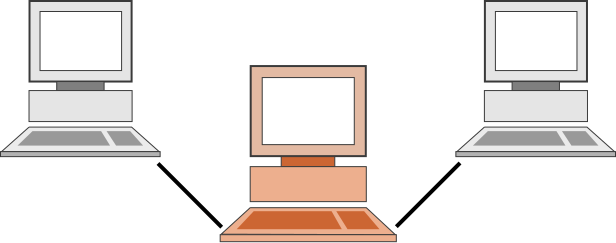
In computer networks, a proxy server is a server (a computer system or an application program) that acts as an intermediary for requests from clients seeking resources from other servers. A client connects to the proxy server, requesting some service, such as a file, connection, web page, or other resource, available from a different server. The proxy server evaluates the request according to its filtering rules. For example, it may filter traffic by IP address or protocol. If the request is validated by the filter, the proxy provides the resource by connecting to the relevant server and requesting the service on behalf of the client. A proxy server may optionally alter the client's request or the server's response, and sometimes it may serve the request without contacting the specified server. In this case, it 'caches' responses from the remote server, and returns subsequent requests for the same content directly.


Schematic representation of a proxy server, where the computer in the middle acts as the proxy server between the other two.

A proxy server has many potential purposes, including:

* To keep machines behind it anonymous (mainly for security).[1]
* To speed up access to resources (using caching). Web proxies are commonly used to cache web pages from a web server.[2]
* To apply access policy to network services or content, e.g. to block undesired sites.
* To log / audit usage, i.e. to provide company employee Internet usage reporting.
* To bypass security/ parental controls.
* To scan transmitted content for malware before delivery.
* To scan outbound content, e.g., for data leak protection.
* To circumvent regional restrictions.

A proxy server that passes requests and replies unmodified is usually called a gateway or sometimes tunneling proxy.

A proxy server can be placed in the user's local computer or at various points between the user and the destination servers on the Internet.

A reverse proxy is (usually) an Internet-facing proxy used as a front-end to control and protect access to a server on a private network, commonly also performing tasks such as load-balancing, authentication, decryption or caching.

Caching proxy server

A caching proxy server accelerates service requests by retrieving content saved from a previous request made by the same client or even other clients. Caching proxies keep local copies of frequently requested resources, allowing large organizations to significantly reduce their upstream bandwidth usage and cost, while significantly increasing performance. Most ISPs and large businesses have a caching proxy. These machines are built to deliver superb file system performance (often with RAID and journaling) and also contain hot-rodded versions of TCP. Caching proxies were the first kind of proxy server.
Another important use of the proxy server is to reduce the hardware cost. An organization may have many systems on the same network or under control of a single server, prohibiting the possibility of an individual connection to the Internet for each system. In such a case, the individual systems can be connected to one proxy server, and the proxy server connected to the main server.

Web proxy

A proxy that focuses on World Wide Web traffic is called a "web proxy". The most common use of a web proxy is to serve as a web cache. Most proxy programs provide a means to deny access to URLs specified in a blacklist, thus providing content filtering. This is often used in a corporate, educational or library environment, and anywhere else where content filtering is desired. Some web proxies reformat web pages for a specific purpose or audience, such as for cell phones and PDAs.
.
Content-filtering web proxy

A content-filtering web proxy server provides administrative control over the content that may be relayed through the proxy. It is commonly used in both commercial and non-commercial organizations (especially schools) to ensure that Internet usage conforms to acceptable use policy. A content filtering proxy will often support user authentication, to control web access. It also usually produces logs, either to give detailed information about the URLs accessed by specific users, or to monitor bandwidth usage statistics. It may also communicate to daemon-based and/or ICAP-based antivirus software to provide security against virus and other malware by scanning incoming content in real time before it enters the network.

Anonymizing proxy server

An anonymous proxy server (sometimes called a web proxy) generally attempts to anonymize web surfing. There are different varieties of anonymizers. One of the more common variations is the open proxy. Because they are typically difficult to track, open proxies are especially useful to those seeking online anonymity, from political dissidents to computer criminals
Access control: Some proxy servers implement a logon requirement. In large organizations, authorized users must log on to gain access to the web. The organization can thereby track usage to individuals.

Hostile proxy

Proxies can also be installed in order to eavesdrop upon the dataflow between client machines and the web. All accessed pages, as well as all forms submitted, can be captured and analyzed by the proxy operator. For this reason, passwords to online services (such as webmail and banking) should always be exchanged over a cryptographically secured connection, such as SSL.

Intercepting proxy server

An intercepting proxy combines a proxy server with a gateway or router (commonly with NAT capabilities). Connections made by client browsers through the gateway are diverted to the proxy without client-side configuration (or often knowledge). Connections may also be diverted from a SOCKS server or other circuit-level proxies.

Intercepting proxies are also commonly referred to as "transparent" proxies, or "forced" proxies, presumably because the existence of the proxy is transparent to the user, or the user is forced to use the proxy regardless of local settings.

Purpose

Intercepting proxies are commonly used in businesses to prevent avoidance of acceptable use policy, and to ease administrative burden, since no client browser configuration is required. This second reason however is mitigated by features such as Active Directory group policy, or DHCP and automatic proxy detection.

Intercepting proxies are also commonly used by ISPs in some countries to save upstream bandwidth and improve customer response times by caching. This is more common in countries where bandwidth is more limited (e.g. island nations) or must be paid for.

Transparent and non-transparent proxy server

The term "transparent proxy" is most often used incorrectly to mean "intercepting proxy" (because the client does not need to configure a proxy and cannot directly detect that its requests are being proxied). Transparent proxies can be implemented using Cisco's WCCP (Web Cache Control Protocol). This proprietary protocol resides on the router and is configured from the cache, allowing the cache to determine what ports and traffic is sent to it via transparent redirection from the router. This redirection can occur in one of two ways: GRE Tunneling (OSI Layer 3) or MAC rewrites (OSI Layer 2).
Forced proxy
The term "forced proxy" is ambiguous. It means both "intercepting proxy" (because it filters all traffic on the only available gateway to the Internet) and its exact opposite, "non-intercepting proxy" (because the user is forced to configure a proxy in order to access the Internet).Forced proxy operation is sometimes necessary due to issues with the interception of TCP connections and HTTP. For instance, interception of HTTP requests can affect the usability of a proxy cache, and can greatly affect certain authentication mechanisms. This is primarily because the client thinks it is talking to a server, and so request headers required by a proxy are unable to be distinguished from headers that may be required by an upstream server (esp authorization headers). Also the HTTP specification prohibits caching of responses where the request contained an authorization header.
Suffix proxy

A suffix proxy server allows a user to access web content by appending the name of the proxy server to the URL of the requested content (e.g. "en.wikipedia.org.6a.nl").
Open proxy server
Because proxies might be used to abuse, system administrators have developed a number of ways to refuse service to open proxies. Many IRC networks automatically test client systems for known types of open proxy. Likewise, an email server may be configured to automatically test e-mail senders for open proxies.
Reverse proxy server

A reverse proxy is a proxy server that is installed in the neighborhood of one or more web servers. All traffic coming from the Internet and with a destination of one of the web servers goes through the proxy server. There are several reasons for installing reverse proxy servers:

* Encryption / SSL acceleration: when secure web sites are created, the SSL encryption is often not done by the web server itself, but by a reverse proxy that is equipped with SSL acceleration hardware. See Secure Sockets Layer. Furthermore, a host can provide a single "SSL proxy" to provide SSL encryption for an arbitrary number of hosts; removing the need for a separate SSL Server Certificate for each host, with the downside that all hosts behind the SSL proxy have to share a common DNS name or IP address for SSL connections.
* Load balancing: the reverse proxy can distribute the load to several web servers, each web server serving its own application area. In such a case, the reverse proxy may need to rewrite the URLs in each web page (translation from externally known URLs to the internal locations).
* Serve/cache static content: A reverse proxy can offload the web servers by caching static content like pictures and other static graphical content.
* Compression: the proxy server can optimize and compress the content to speed up the load time.
* Spoon feeding: reduces resource usage caused by slow clients on the web servers by caching the content the web server sent and slowly "spoon feeding" it to the client. This especially benefits dynamically generated pages.
* Security: the proxy server is an additional layer of defense and can protect against some OS and WebServer specific attacks. However, it does not provide any protection to attacks against the web application or service itself, which is generally considered the larger threat.
* Extranet Publishing: a reverse proxy server facing the Internet can be used to communicate to a firewalled server internal to an organization, providing extranet access to some functions while keeping the servers behind the firewalls. If used in this way, security measures should be considered to protect the rest of your infrastructure in case this server is compromised, as its web application is exposed to attack from the Internet.

Tunneling proxy server

A tunneling proxy server is a method of defeating blocking policies implemented using proxy servers. Most tunneling proxy servers are also proxy servers, of varying degrees of sophistication, which effectively implement "bypass policies".A tunneling proxy server is a web-based page that takes a site that is blocked and "tunnels" it, allowing the user to view blocked pages. A famous example is elgooG, which allowed users in China to use Google after it had been blocked there. elgooG differs from most tunneling proxy servers in that it circumvents only one block.

Content filter

Many work places, schools, and colleges restrict the web sites and online services that are made available in their buildings. This is done either with a specialized proxy, called a content filter (both commercial and free products are available), or by using a cache-extension protocol such as ICAP, that allows plug-in extensions to an open caching architecture.
equests made to the open internet must first pass through an outbound proxy filter. The web-filtering company provides a database of URL patterns (regular expressions) with associated content attributes.

Transmission Circuits DS-1, DS-3, T-1, E-1

DS or Digital Signal, are categorized into 7 categories. the DS0, DS1, DS1C, DS2, DS3, DS3C and DS4.

DS-0
Digital Signal 0 (DS0) is a basic digital signalling rate of 64 kbit/s, corresponding to the capacity of one voice-frequency-equivalent channel.
The DS0 rate was introduced to carry a single digitized voice call. For a typical phone call, the audio sound is digitized at an 8 kHz sample rate using 8-bit pulse-code modulation for each of the 8000 samples per second. This resulted in a data rate of 64 kbit/s.

DS-3
A Digital Signal 3 (DS3) is a digital signal level 3 T-carrier. It may also be referred to as a T3 line.

* The data rate for this type of signal is 44.736 Mbit/s.
* This level of carrier can transport 28 DS1 level signals within its payload.
* This level of carrier can transport 672 DS0 level channels within its payload.
Used for The level of transport or circuit is mostly used between telephony carriers, both wired and wireless.

T-Carriers

In telecommunications, T-carrier, sometimes abbreviated as T-CXR, is the generic designator for any of several digitally multiplexed telecommunications carrier systems originally developed by Bell Labs and used in North America, Japan, and Korea.
T-1 = runs at original 1.544 Kbit/s line rate

"T1" now means any data circuit that runs at the original 1.544 Mbit/s line rate. Originally the T1 format carried 24 pulse-code modulated, time-division multiplexed speech signals each encoded in 64 kbit/s streams, leaving 8 kbit/s of framing information which facilitates the synchronization and demultiplexing at the receiver. T2 and T3 circuit channels carry multiple T1 channels multiplexed, resulting in transmission rates of 6.312 and 44.736 Mbit/s, respectively.

E-Carriers

In digital telecommunications, where a single physical wire pair can be used to carry many simultaneous voice conversations, worldwide standards have been created and deployed. The European Conference of Postal and Telecommunications Administrations (CEPT) originally standardized the E-carrier system, which revised and improved the earlier American T-carrier technology, and this has now been adopted by the International Telecommunication Union Telecommunication Standardization Sector (ITU-T).

E-1 = 2.048 Mbit/sec

An E1 link operates over two separate sets of wires, usually twisted pair cable. A nominal 3 Volt peak signal is encoded with pulses using a method that avoids long periods without polarity changes. The line data rate is 2.048 Mbit/s (full duplex, i.e. 2.048 Mbit/s downstream and 2.048 Mbit/s upstream) which is split into 32 timeslots, each being allocated 8 bits in turn. Thus each timeslot sends and receives an 8-bit sample 8000 times per second (8 x 8000 x 32 = 2,048,000). This is ideal for voice telephone calls where the voice is sampled into an 8 bit number at that data rate and reconstructed at the other end.

Monday, January 11, 2010

CAT 7 cable

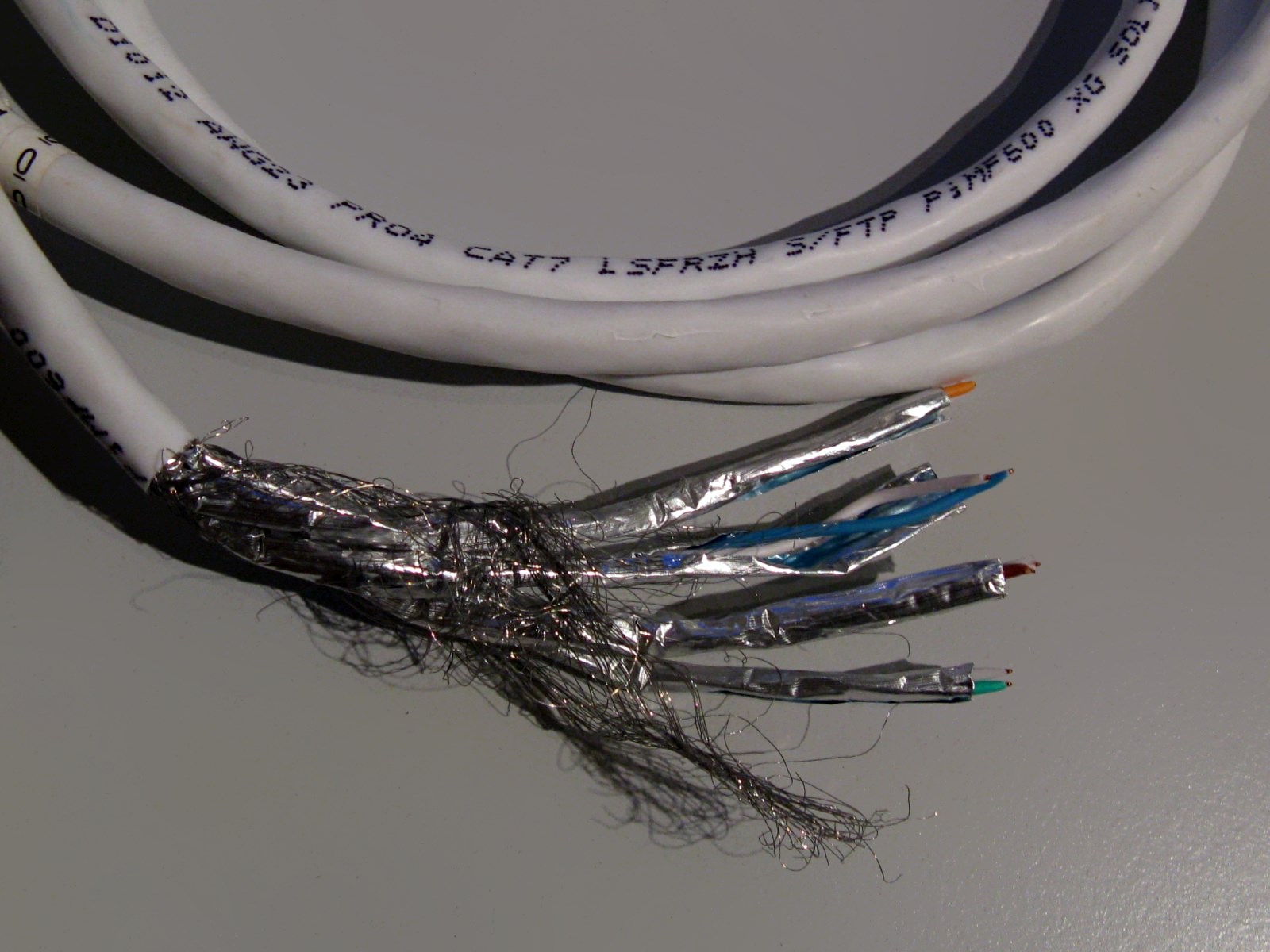
Category 7 cable (Cat 7), (ISO/IEC 11801:2002 category 7/class F), is a cable standard for Ethernet and other interconnect technologies that can be made to be backwards compatible with traditional Cat 5 and Cat 6 Ethernet cable. Cat 7 features even more strict specifications for crosstalk and system noise than Cat 6. To achieve this, shielding has been added for individual wire pairs and the cable as a whole. Category 7 is not recognized in EIA/TIA standards but it is used and marketed in industry.


The Cat 7 cable standard has been created to allow 10 Gigabit Ethernet over 100 m of copper cabling (also, 10-Gbit/s Ethernet now is typically run on Cat 6a). The cable contains four twisted copper wire pairs, just like the earlier standards. Cat 7 can be terminated either with 8P8C compatible GG45 electrical connectors which incorporate the 8P8C standard or with TERA connectors. When combined with GG45 or TERA connectors, Cat 7 cable is rated for transmission frequencies of up to 600 MHz.

Category 7a (or Augmented Category 7) is defined at frequencies up to 1000 MHz, suitable for multiple applications in a single cable (just like all other categories) including CATV (862 MHz) .[1][2][3] Simulation results have shown that 40 Gigabit Ethernet is possible at 50 meters and 100 Gigabit Ethernet is possible at 15 meters.[1] Mohsen Kavehrad and researchers at The Pennsylvania State University believe that either 32 nm or 22 nm circuits will allow for 100 Gigabit Ethernet at 100 meters.[4][5]

However, similar studies in the past have shown that Cat5e could support 10G, so these should be read with caution. Furthermore, the IEEE is currently not looking into 40G or 100G for Cat7a. It may in the future, but there is absolutely no guarantee that such applications will ever exist.

Cat7a is currently a draft in ISO standards for channel and permanent link. Component performance is yet to be looked into. TIA/EIA currently is not working on any Cat7a standard.

Tuesday, January 5, 2010

JUDE 1:3-NIV

Jude 1:3 (New International Version)

The sin and doom of Godless men
3Dear friends, although I was very eager to write to you about the salvation we share, I felt I had to write and urge you to contend for the faith that was once for all entrusted to the saints.

i7 extreme GAMING PROCESSOR


Fastest performing processor on the planet: the Intel® Core™ i7 processor Extreme Edition.¹ With faster, intelligent multi-core technology that accelerates performance to match your workload, it delivers an incredible breakthrough in gaming performance.

* 3.20 GHz and 3.33GHz core speed
* 8 processing threads with Intel® HT technology
* 8 MB of Intel® Smart Cache
* 3 Channels of DDR3 1066 MHz memory
REFERENCE: i7extreme INTEL

INTEL i7 Facts and Performances-SUM UP


♦ Enabling Intel® Turbo Boost Technology (Intel® TBT) requires a PC with a processor with Intel TBT capability. Intel TBT performance varies depending on hardware, software and overall system configuration.
± Intel® Virtualization Technology (Intel® VT), Intel® Trusted Execution Technology (Intel® TXT), and Intel® 64 architecture require a computer system with a processor, chipset, BIOS, enabling software and/or operating system, device drivers and applications designed for these features.
Φ 64-bit computing on Intel® architecture requires a computer system with a processor, chipset, BIOS, operating system, device drivers, and applications enabled for Intel® 64 architecture. Processors will not operate (including 32-bit operation) without an Intel 64 architecture-enabled BIOS.

Intel® 64 Architecture

Intel® 64 architecture delivers 64-bit computing on server, workstation, desktop and mobile platforms when combined with supporting software.¹ Intel 64 architecture improves performance by allowing systems to address more than 4 GB of both virtual and physical memory.

Intel® 64 provides support for:

* 64-bit flat virtual address space
* 64-bit pointers
* 64-bit wide general purpose registers
* 64-bit integer support
* Up to one terabyte (TB) of platform address space


Intel® Turbo Boost Technology
Intel® Turbo Boost Technology is one of the many exciting new features that Intel has built into latest-generation Intel® microarchitecture (codenamed Nehalem). It automatically allows processor cores to run faster than the base operating frequency if it's operating below power, current, and temperature specification limits.

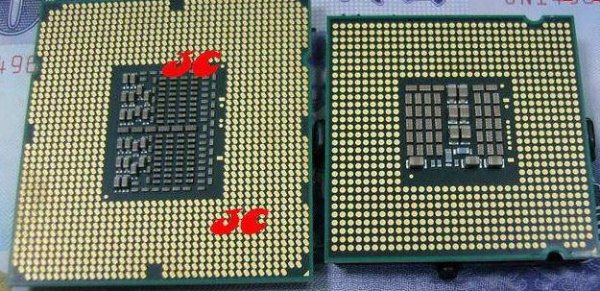
Land Grid Architecture


When the processor is operating below these limits and the user's workload demands additional performance, the processor frequency will dynamically increase by 133 MHz on short and regular intervals until the upper limit is met or the maximum possible upside for the number of active cores is reached. Conversely, when any of the limits are reached or exceeded, the processor frequency will automatically decrease by 133 MHz until the processor is again operating within its limits.

AMD Athlon X2 64 Processor

The AMD Opteron™ processor, the AMD Athlon™ processor family, and AMD Turion™ 64 mobile technology comprise the AMD64 family.

* AMD Opteron processor - servers and workstations
* AMD Athlon processor family - desktops and notebooks
* AMD Turion 64 mobile technology - notebooks

AMD64 is designed to enable simultaneous 32- and 64-bit computing with no degradation in performance. With Direct Connect Architecture, AMD64 processors address and help eliminate the real challenges and bottlenecks of system architectures because everything is directly connected to the central processing unit.

All AMD64 processors are enabled with Enhanced Virus Protection, including:
Reference: AMD

* AMD Phenom™ X4 Quad-Core Processors
* The AMD Athlon™ Dual-Core Processors
* AMD Athlon™ for Desktop
* Mobile AMD Athlon™ processors
* AMD Turion™ 64 X2 Dual-Core Mobile Technology
* AMD Sempron™ processors

AMD HyperTransport™ Technology

HyperTransport(TM) Consortium Logo

HyperTransport™ Technology is a high-speed, low latency, point-to-point link designed to increase the communication speed between integrated circuits in computers, servers, embedded systems, and networking and telecommunications equipment up to 48 times faster than some existing technologies.

HyperTransport Technology helps reduce the number of buses in a system, which can reduce system bottlenecks and enable today's faster microprocessors to use system memory more efficiently in high-end multiprocessor systems.

HyperTransport Technology is designed to:

* Provide significantly more bandwidth than current technologies
* Use low-latency responses and low pin counts
* Maintain compatibility with legacy PC buses while being extensible to new SNA (Systems Network Architecture) buses
* Appear transparent to operating systems and offer little impact on peripheral drivers

HyperTransport Technology was invented at AMD with contributions from industry partners and is managed and licensed by the HyperTransport Technology Consortium, a Texas non-profit corporation.

The full specification and more information about HyperTransport Technology can be found at the HyperTransport web site.

HyperTransport Technology is a licensed trademark of the HyperTransport Technology Consortium.

Cool 'N' Quiet™ 2.0 Technology

With the next generation of award-winning power saving technology, Cool'n'Quiet™ 2.0 Technology reduces heat and noise so you can experience amazing performance without distraction. Combined with core enhancements, included in the AMD Phenom™ processor, that can improve overall power savings, deliver seamless multitasking and energy efficiency. Work, play, talk, and share on a PC that's seen, not heard.
New features:

* Independent Dynamic Core Technology- Helps users get more efficient performance by dynamically adjusting individual core frequencies as required by utilization needs
* Dual Dynamic Power Management™ - Helps improve platform efficiency by providing full-speed memory performance while enabling decreased system power consumption.
* AMD CoolCore™ Technology - Helps users get more efficient performance by dynamically activating or turning off parts of the processor.
* AMD Wideband Frequency Control - Allows the processor to respond more precisely to user demands, maximizing performance to deliver a better PC user experience.
* Multi-Point Thermal Control - Prevents processor from creating too much heat and enables a cooler, quieter PC experience

Cool 'N' Quiet™ 3.0 Technology

Capitalizing on AMD's leadership in energy efficiency with innovations such as, AMD Cool'n'Quiet™ 3.0 Technology, AMD Phenom™ II processors give you performance when you need it and save power when you don't.

In addition to the features included with Cool'n'Quiet 2.0 Technology, the following new features have been added:

* AMD Smart Fetch Technology - Fewer processing cycles are required to locate information since data storage is streamlined and stored in the shared L3 cache. Provides CPU power savings by maintaining processor sleep states and sharing cached data between cores.
* 45 nm Process Technology with Immersion Lithography - puts more transistors in less space and delivers better processor performance while using less power.

AMD's Energy Efficient processors offer technology partners energy-efficient options to create small, quiet and attractive solutions so that enterprises and consumers alike have more pleasant computing experiences. By using less electricity, energy efficient AMD desktop processors can lead to lower energy consumption, contributing to an improved global environment.
Get More with Less Power.

Energy-efficient AMD processors with Cool'n'Quiet™ Technology enable smaller, sleeker, more energy-efficient PC's. In March 2005, the U.S. Environmental Protection Agency (EPA) awarded Cool'n'Quiet Technology special recognition for the advancement of energy-efficient computer technologies. AMD expects that systems built using energy-efficient AMD desktop processors can meet, and in many instances, exceed the new system requirements from the EPA's ENERGY STAR Version 4 computer specification, effective July 20, 2007.

Saturday, December 26, 2009

ASUS P7P55D-E Premium Motherboard Review


Features:
* LGA-1156 CPU Support
* Intel P55 Chipset
* DDR3-2200 (OC)
* SATA 6Gb/second
* Dual Gigabit LAN
* 10 Channel Audio
* USB 3.0
* T.Probe
* Unique Layout
* TurboV EVO
* Precision Tweaker 2
* MemOK!
* StackCool 3
* Q-Design
* 48 Hybrid Phase Design
* Windows 7 Ready
* TurboV Remote
* SLI and CrossfireX support
* 100% Ultra-Long-Life Japan-made Solid Cap
* NVIDIA PhysX ready

The ASUS P7P55D-E Premium is based upon Intel’s P55 chipset. The LGA-1156 CPU interface has moved the PCI Express lanes to the CPU from the Northbridge where they were previously. This means that the Northbridge and Southbridge combination found in earlier motherboards has been replaced by the CPU+Platform Controller Hub combination.

The memory controller on this new platform is on the CPU itself, meaning that the memory supported by the P7P55D-E Premium is up to DDR3-1333 (CPU). Faster speeds are possible and with overclocking the board can support up to DDR3-2200MHz memory. The ASUS motherboard also supports Intel’s eXtreme Memory Profiles allowing the memory to use the higher settings stored in SPD.

Part Number P7P55D-E Premium
Manufacturer ASUS
Chipset P55 Express
North Bridge N/A
Socket LGA-1156
Memory speed DDR3 2200 (OC)/1600/1333/1066
Processor Types Core i7, Core i5
Number of CPUs 1
QPI Up to 4.8GT/second
Memory Type DDR3
Memory Channels Double
Maximum Memory 16GB
External Graphics PCI Express x16 2.0 x2
IGP N/A
South Bridge P55 Express
Audio 8-channel
IDE 133/100/66
SCSI None
SATA 3.0 GB/s, 6.0Gb/s on two ports
RAID 0, 1, 0+1, 5, 10
LAN 10/100/1000 4 LAN Ports
Firewire IEEE 1394a
USB USB 3.0
BIOS AMIBIOS
Form Factor ATX

Tuesday, December 15, 2009

Windows Server 2008

Windows Server 2008 is one of Microsoft Windows' server line of operating systems. Released to manufacturing on February 4, 2008, and officially released on February 27, 2008, it is the successor to Windows Server 2003, released nearly five years earlier. A second release, named Windows Server 2008 R2, was released to manufacturing on July 22, 2009.Like Windows Vista and Windows 7, Windows Server 2008 is built on Windows NT 6.x.

Originally known as Windows Server Codename "Longhorn", Microsoft chairman Bill Gates announced its official title (Windows Server 2008) during his keynote address at WinHEC 16 May 2007Beta 1 was released on 27 July 2005, Beta 2 was announced and released on 23 May 2006 at WinHEC 2006 and Beta 3 was released publicly on 25 April 2007. Release Candidate 0 was released to the general public on 24 September 2007and Release Candidate 1 was released to the general public on 5 December 2007. Windows Server 2008 was released to manufacturing on 4 February 2008 and officially launched on 27 February 2008.
Features
Windows Server 2008 is built from the same code base as Windows Vista; therefore, it shares much of the same architecture and functionality. Since the code base is common, it automatically comes with most of the technical, security, management and administrative features new to Windows Vista such as the rewritten networking stack (native IPv6, native wireless, speed and security improvements); improved image-based installation, deployment and recovery; improved diagnostics, monitoring, event logging and reporting tools; new security features such as BitLocker and ASLR; improved Windows Firewall with secure default configuration; .NET Framework 3.0 technologies, specifically Windows Communication Foundation, Microsoft Message Queuing and Windows Workflow Foundation; and the core kernel, memory and file system improvements. Processors and memory devices are modelled as Plug and Play devices, to allow hot-plugging of these devices. This allows the system resources to be partitioned dynamically using Dynamic Hardware Partitioning; each partition has its own memory, processor and I/O host bridge devices independent of other partitions.[
Server Core
Windows Server 2008 includes a variation of installation called Server Core. Server Core is a significantly scaled-back installation where no Windows Explorer shell is installed. All configuration and maintenance is done entirely through command line interface windows, or by connecting to the machine remotely using Microsoft Management Console. However, Notepad and some control panel applets, such as Regional Settings, are available.

Server Core does not include the .NET Framework, Internet Explorer, Windows PowerShell or many other features not related to core server features. A Server Core machine can be configured for several basic roles: Domain controller/Active Directory Domain Services, ADLDS (ADAM), DNS Server, DHCP Server, file server, print server, Windows Media Server, IIS 7 web server and Hyper-V virtual server. Server Core can also be used to create a cluster with high availability using Failover Clustering or Network Load Balancing.

Andrew Mason, a program manager on the Windows Server team, noted that a primary motivation for producing a Server Core variant of Windows Server 2008 was to reduce the attack surface of the operating system, and that about 70% of the security vulnerabilities in Microsoft Windows from the prior five years would not have affected Server Core.
Failover Clustering

Windows Server 2008 offers high-availability to services and applications through Failover Clustering. Most server features and roles can be kept running with little to no downtime.

In Windows Server 2008 and Windows Server 2008 R2, the way that clusters are qualified is changing significantly with the introduction of the cluster validation wizard
The cluster validation wizard is a feature that is integrated into failover clustering in Windows Server 2008 and Windows Server 2008 R2. With the cluster validation wizard, you can run a set of focused tests on a collection of servers that you intend to use as nodes in a cluster. This cluster validation process tests the underlying hardware and software directly, and individually, to obtain an accurate assessment of how well failover clustering can be supported on a given configuration.It is done by "dcpromo" command in windows server
Windows PowerShell
Windows Server 2008 is the first Windows operating system to ship with Windows PowerShell, Microsoft's new extensible command line shell and task-based scripting technology.[PowerShell is based on object-oriented programming and version 2.0 of the Microsoft .NET Framework and includes more than 120 system administration utilities, consistent syntax and naming conventions, and built-in capabilities to work with common management data such as the Windows Registry, certificate store, or Windows Management Instrumentation. PowerShell's scripting language was specifically designed for IT administration, and can be used in place of cmd.exe and Windows Script Host.
Self-healing NTFS

In previous Windows versions, if the operating system detected corruption in the file system of an NTFS volume, it marked the volume "dirty"; to correct errors on the volume, it had to be taken offline. With self-healing NTFS, an NTFS worker thread is spawned in the background which performs a localized fix-up of damaged data structures, with only the corrupted files/folders remaining unavailable without locking out the entire volume and needing the server to be taken down. The operating system now features S.M.A.R.T. detection techniques to help determine when a hard disk may fail. This feature was first presented within Windows Vista.
Hyper-V
Hyper-V is a hypervisor-based virtualization system, forming a core part of Microsoft's virtualization strategy. It virtualizes servers on an operating system's kernel layer. It can be thought of as partitioning a single physical server into multiple small computational partitions. Hyper-V includes the ability to act as a Xen virtualization hypervisor host allowing Xen-enabled guest operating systems to run virtualized. A beta version of Hyper-V ships with certain x86-64 editions of Windows Server 2008. Microsoft released the final version of Hyper-V on 26 June 2008 as a free download. Also, a standalone version of Hyper-V exists. This version also only supports the x86-64 architectureWhile the x86 editions of Windows Server 2008 cannot run the Hyper-V integrations, they can run the Manager Console and Hyper-V tools.

Wednesday, December 2, 2009

OVERVIEW:AutomatedVotinSystem-AVS

Proposed


The Automated Voting System is a computerized voting mechanism that enables user to vote for any candidate in an easier and more convenient way. This system will be implemented in a small scale environment more specifically Universities and Schools. AVS prevents multiple voting entries from same user via user identity scanning. A user presents a unique voter’s ID and is recorded in a database. Thus, all voters in the vicinity are recorded in one database as records of their existence. In a university/school in particular, a voter that is not recorded in the schools database is an invalid entry and AVS will not accept any point/s from unknown voter/s.
The database that is the back-end of AVS is impossible to have redundant entry of same ID or user information since the ID is the primary key of an individual and tracks any kind of entry that resembles that of another data. AVS is database dependent that it is functional with the correct record connected to its mechanism.
AVS provides a user-friendly user interface that enables users to have an easy voting process. It has buttons and dialogue boxes that prompt errors of progresses to ensure user stability and consistency. AVS is a distributive system, in cases the AVS is divided into two major sectors: the Administrator’s and the User’s. The Administrator is the main server of the AVS and it will be connected to two (2) or more nodes via LAN connection. All entry and result will be passed on to the server where the moderator is the only one to see the partial or the final result of the election. The user’s accessibility is limited such that the system installed to a node separated from the server offers voting functionality only and doesn’t have any viewing or advance way in, neither they can re-vote or re-edit any of their entry unless prompted by the system to do so. As a start, the candidate also has to fill up a form in the system, serves as a candidacy form for the program to initiate the proper student or candidate to receive a point.
In the Administrators part, the main functionality that is able in administration is the viewing of results, posting the final tally of votes and resetting the system for system reuse. The Moderator cannot modify any entry from the user nor change the existing result from the system. In cases such that the system will be used for another set of candidates, the moderator has a function in resetting the system to its default settings. Where everything is blanked, from candidates up to the points produced, and will need to re-enter another set of election candidates and in some cases another set of data or database to connect to the AVS.

Thursday, November 26, 2009

Updates: Gadgets 2010

Apple iTablet
Currently, there are some rumors about two new “tablet” projects: Apple iTablet and Microsoft Courier.


As for the Microsoft Courier, apparently, this Tablet PC is in the last stage of development and its features would make it look more like a Booklet than a Tablet PC. Although an official introduction of this device has not been carried out, Microsoft is already studying impressions of some users that have used a Tablet PC, which is a term that refers to computers equipped with a touchscreen (or graphics tablet/screen hybrid) and complex settings, applications and modes.


At the moment it is known that (with regard to the features of the new Microsoft product) it will have a dual 7-inch display with multitouch support where the user will be able to turn over pages, write, and draw by using the fingers or a stylus pen. The display also will show the battery level and the internet connection status on a side area. In addition, the Microsoft Courier will come with a photo camera on the back of the device, but it is unknown how many pixels will be featured.

Tuesday, November 24, 2009

Patch Panel and Modular Jacks

There are Passive Components that are unfamiliar to IT professionals and even to Industry related personnel.

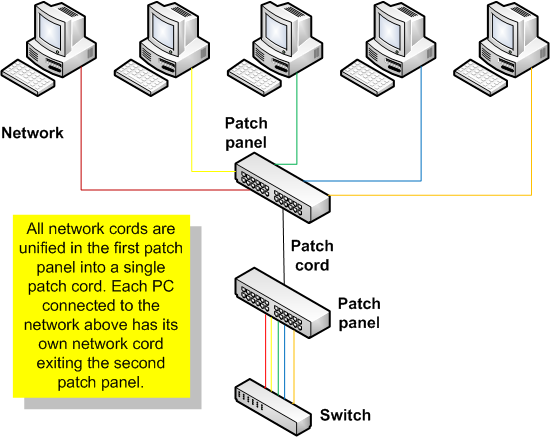
patch panel or patch bay is a panel, typically rackmounted, that houses cable connections.
Diagram:

Sample Image:


Modular Jacks
Modular jack connectors, a cornerstone of communications technology, have been used in the telecommunications and ethernet industry for many years. The main reasons for this are the simplicity and reliability of these products. Whether integrated in a simple telephone system, or in a gigabit application, “mod. jacks” represent the standard for network connections. Mod. jacks can be obtained in many different versions. Increasing data rates and space-saving requirements are driving increasing requests for these connectors with integrated filter components.
Modular Jacks:

Differentiating Routers and Switches

As for switches, it's main function is to only connect networking segments to create communication between nodes through computer gateways like the Ethernet. Switches commonly processes data at the OSI layer 2 or the data link layer. Since Switches typically transfers data from interconnected nodes in a networked area. Switches is a Point-to-Point or Point-to-Multipoint data transfer and a PPP or Point to Point Protocol.

Switch

While Routers are the kind of Active networking Component that connects multiple extended networks together. It sends packets of data from multiple sources and sends it to addressed destinations.

Router


That is Routers belongs to the Layer of the OSI Layer (Networking Layer). It transfers length of data from point-to-destination via one or more networks with quality service required by the transport layer.

In Conclusion, as what I've understood--Switches are for LAN purposes or distribution for internet connection since it is only concerned with the Layer 2 of the OSI model which is the Data Link Layer or transferring of data.
And Routers are more to network-to-network (WAN or MAN) connectivity rather than LAN.

Routers


For us to differentiate Routers to Switches, read.

Routers are physical devices that join multiple wired or wireless networks together. Technically, a wired or wireless router is a Layer 3 gateway, meaning that the wired/wireless router connects networks (as gateways do), and that the router operates at the network layer of the OSI model.
More technically, a router is a networking device whose software and hardware are usually tailored to the tasks of routing and forwarding information. Routers connect two or more logical subnets, which do not necessarily map one-to-one to the physical interfaces of the router. The term "layer 3 switching" is often used interchangeably with routing, but switch is a general term without a rigorous technical definition. In marketing usage, a switch is generally optimized for Ethernet LAN interfaces and may not have other physical interface types. In comparison, the network hub (predecessor of the "switch" or "switching hub") does not do any routing, instead every packet it receives on one network line gets forwarded to all the other network lines.

Home networkers often use an Internet Protocol (IP) wired or wireless router, IP being the most common OSI network layer protocol. An IP router such as a DSL or cable modem broadband router joins the home's local area network (LAN) to the wide-area network (WAN) of the Internet.

Routers operate in two different planes:
* Control plane, in which the router learns the outgoing interface that is most appropriate for forwarding specific packets to specific destinations,
* Forwarding plane, which is responsible for the actual process of sending a packet received on a logical interface to an outbound logical interface.

Routers may provide connectivity inside enterprises, between enterprises and the Internet, and inside Internet Service Providers (ISPs). The largest routers (for example the Cisco CRS-1 or Juniper T1600) interconnect ISPs, are used inside ISPs, or may be used in very large enterprise networks. The smallest routers provide connectivity for small and home offices.
[edit] Routers for Internet connectivity and internal use

Routers intended for ISP and major enterprise connectivity will almost invariably exchange routing information with the Border Gateway Protocol (BGP). RFC 4098[3] defines several types of BGP-speaking routers:

* Edge Router: Placed at the edge of an ISP network, it speaks external BGP (eBGP) to a BGP speaker in another provider or large enterprise Autonomous System(AS) .
* Subscriber Edge Router: Located at the edge of the subscriber's network, it speaks eBGP to its provider's AS(s). It belongs to an end user (enterprise) organization.
* Inter-provider Border Router: Interconnecting ISPs, this is a BGP speaking router that maintains BGP sessions with other BGP speaking routers in other providers' ASes.
* Core router: A router that resides within the middle or backbone of the LAN network rather than at its periphery.

Within an ISP: Internal to the provider's AS, such a router speaks internal BGP (iBGP) to that provider's edge routers, other intra-provider core routers, or the provider's inter-provider border routers.
"Internet backbone:" The Internet does not have a clearly identifiable backbone, as did its predecessors. See default-free zone (DFZ). Nevertheless, it is the major ISPs' routers that make up what many would consider the core. These ISPs operate all four types of the BGP-speaking routers described here. In ISP usage, a "core" router is internal to an ISP, and used to interconnect its edge and border routers. Core routers may also have specialized functions in virtual private networks based on a combination of BGP and Multi-Protocol Label Switching (MPLS).
Routers are also used for port forwarding for private servers.

Data Source

Networking SWITCHES

A network switch is a computer networking device that connects network segments.
The term commonly refers to a network bridge that processes and routes data at the data link layer (layer 2) of the OSI model. Switches that additionally process data at the network layer (layer 3 and above) are often referred to as Layer 3 switches or multilayer switches.
The term network switch does not generally encompass unintelligent or passive network devices such as hubs and repeaters.


Function:
The network switch, packet switch (or just switch) plays an integral part in most Ethernet local area networks or LANs. Mid-to-large sized LANs contain a number of linked managed switches. Small office/home office (SOHO) applications typically use a single switch, or an all-purpose converged device such as gateway access to small office/home broadband services such as DSL router or cable Wi-Fi router. In most of these cases, the end user device contains a router and components that interface to the particular physical broadband technology, as in the Linksys 8-port and 48-port devices. User devices may also include a telephone interface to VoIP.

In the context of a standard 10/100 Ethernet switch, a switch operates at the data-link layer of the OSI model to create a different collision domain per switch port. If you have 4 computers A/B/C/D on 4 switch ports, then A and B can transfer data between them as well as C and D at the same time, and they will never interfere with each others' conversations. In the case of a "hub" then they would all have to share the bandwidth, run in Half duplex and there would be collisions and retransmissions. Using a switch is called micro-segmentation. It allows you to have dedicated bandwidth on point to point connections with every computer and to therefore run in Full duplex with no collisions.
Roles:
In the context of a standard 10/100 Ethernet switch, a switch operates at the data-link layer of the OSI model to create a different collision domain per switch port. If you have 4 computers A/B/C/D on 4 switch ports, then A and B can transfer data between them as well as C and D at the same time, and they will never interfere with each others' conversations. In the case of a "hub" then they would all have to share the bandwidth, run in Half duplex and there would be collisions and retransmissions. Using a switch is called micro-segmentation. It allows you to have dedicated bandwidth on point to point connections with every computer and to therefore run in Full duplex with no collisions.

Network switch is a marketing term rather than a technical one.[citation needed] Switches may operate at one or more OSI layers, including physical, data link, network, or transport (i.e., end-to-end). A device that operates simultaneously at more than one of these layers is called a multilayer switch, although use of the term is diminishing.[citation needed]

In switches intended for commercial use, built-in or modular interfaces make it possible to connect different types of networks, including Ethernet, Fibre Channel, ATM, ITU-T G.hn and 802.11. This connectivity can be at any of the layers mentioned. While Layer 2 functionality is adequate for speed-shifting within one technology, interconnecting technologies such as Ethernet and token ring are easier at Layer 3.

Interconnection of different Layer 3 networks is done by routers. If there are any features that characterize "Layer-3 switches" as opposed to general-purpose routers, it tends to be that they are optimized, in larger switches, for high-density Ethernet connectivity.

In some service provider and other environments where there is a need for a great deal of analysis of network performance and security, switches may be connected between WAN routers as places for analytic modules. Some vendors provide firewall,network intrusion detection,and performance analysis modules that can plug into switch ports. Some of these functions may be on combined modules.

In other cases, the switch is used to create a mirror image of data that can go to an external device. Since most switch port mirroring provides only one mirrored stream, network hubs can be useful for fanning out data to several read-only analyzers, such as intrusion detection systems and packet sniffers.

Source

TCP/IP Networking

Although UUCP may be a reasonable choice for low-cost dial-up network links, there are many situations in which its store-and-forward technique proves too inflexible, for example in Local Area Networks (LANs). These are usually made up of a small number of machines located in the same building, or even on the same floor, that are interconnected to provide a homogeneous working environment. Typically, you would want to share files between these hosts, or run distributed applications on different machines.

These tasks require a completely different approach to networking. Instead of forwarding entire files along with a job description, all data is broken up in smaller chunks (packets), which are forwarded immediately to the destination host, where they are reassembled. This type of network is called a packet-switched network. Among other things, this allows to run interactive applications over the network. The cost of this is, of course, a greatly increased complexity in software.

For something concrete to look at as we discuss TCP/IP throughout the following sections, we will consider Groucho Marx University (GMU), situated somewhere in Fredland, as an example. Most departments run their own local area networks, while some share one, and others run several of them. They are all interconnected, and are hooked to the Internet through a single high-speed link.

Suppose your box is connected to a LAN of hosts at the Mathematics Department, and its name is erdos. To access a host at the Physics Department, say quark, you enter the following command:

$ rlogin quark.physics
Welcome to the Physics Department at GMU
(ttyq2) login:

At the prompt, you enter your login name, say andres, and your password. You are then given a shell on quark, to which you can type as if you were sitting at the system's console. After you exit the shell, you are returned to your own machine's prompt. You have just used one of the instantaneous, interactive applications that TCP/IP provides: remote login.